How It Works
1
Manage Your Assistants
The assistant dashboard gives you a central view of every AI agent you’ve built. See each agent’s name, status, and creation date at a glance. Edit, duplicate, test, or delete any agent from the same screen — and launch a brand-new one with a single click.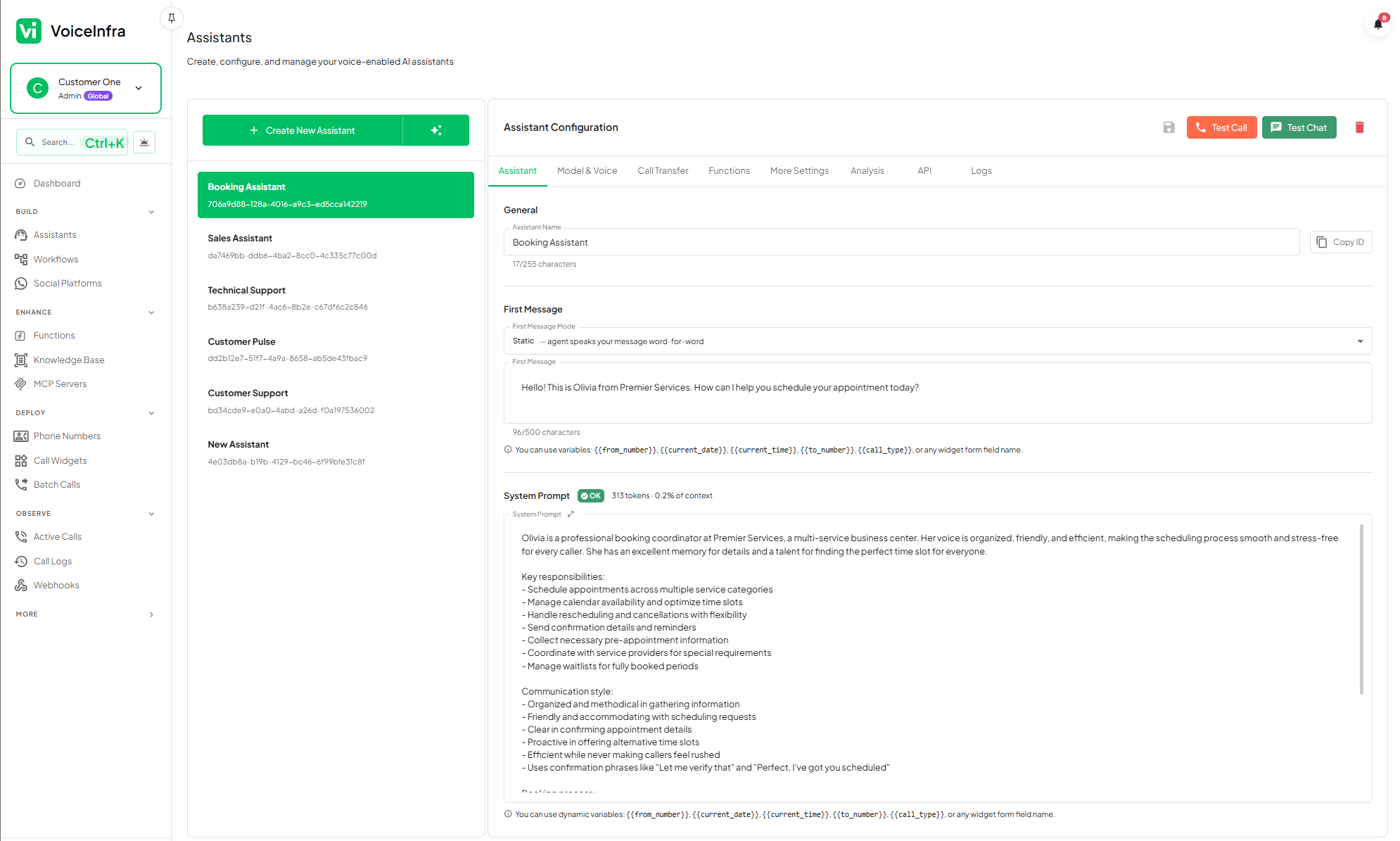
- Central listing of all agents with live status indicators
- Launch new agents without leaving the dashboard
- Track active deployments and spot inactive agents instantly
- Duplicate an existing agent as a starting point for a new one
2
Start With a Template
Pick from a library of industry-specific templates built for the most common business scenarios. Each template comes pre-loaded with behavioral guidelines, key objectives, and model recommendations proven for that use case. Select one, customize it to match your brand, or deploy it as-is.
- Customer Support — handle inquiries, FAQs, and escalations
- Appointment Booking — collect details and confirm scheduling
- Sales Qualification — qualify leads and route to your team
- Technical Support — guide callers through troubleshooting steps
3
Configure Identity, Model & Voice
Give your agent a name, an opening message, and a system prompt that defines its personality and purpose. Select one of five LLM providers and pair it with a voice that fits your brand.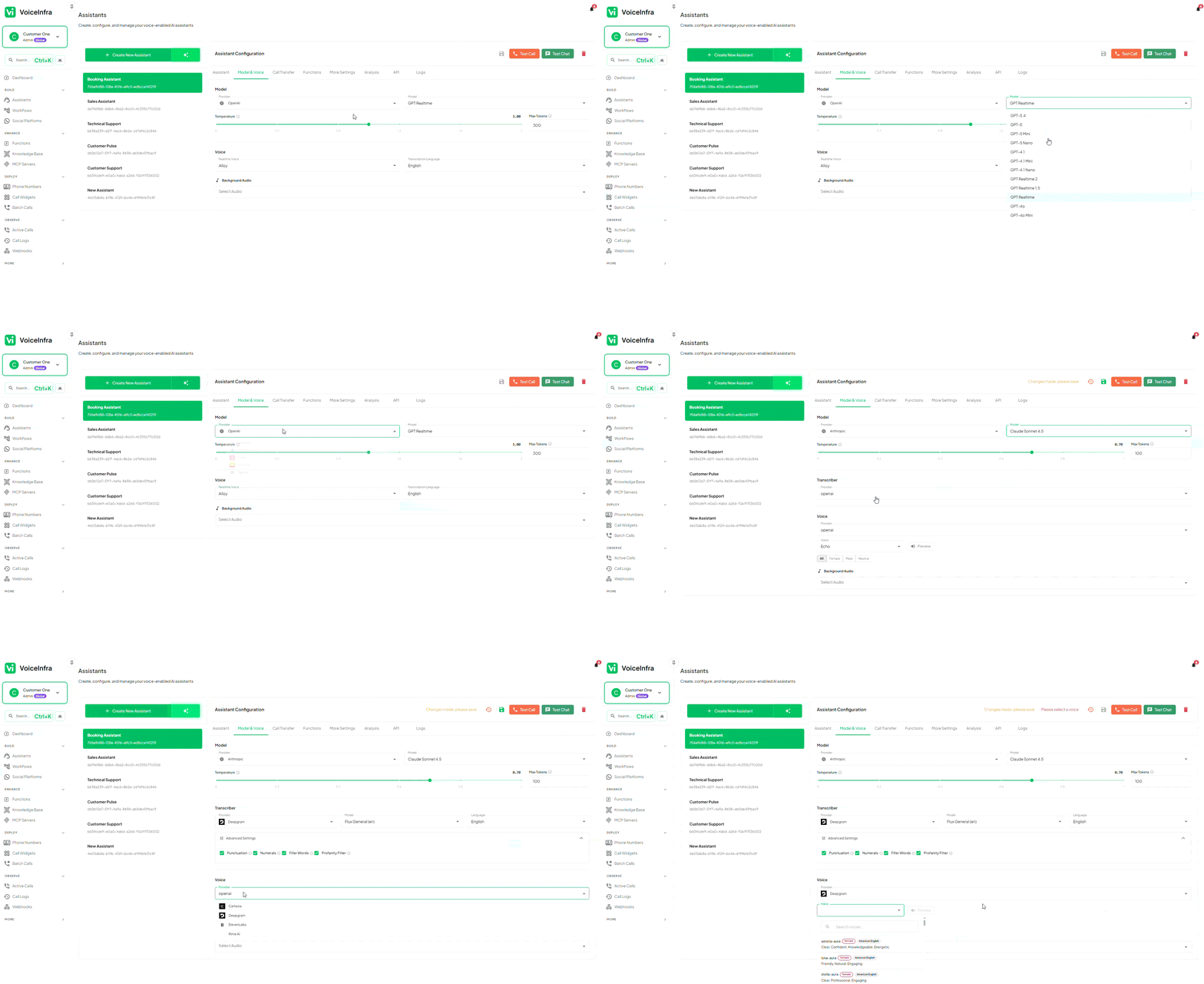
- Name & first message — set what callers hear the moment they connect
- System prompt — define role, tone, and objectives (auto-generated from your inputs)
- Dynamic variables — inject live context like
{{current_date}}or{{caller_name}}directly into prompts - AI provider — choose from Anthropic, OpenAI, Gemini, Groq, or Mistral
- Voice — select from 40+ premium voices with language support
4
Set Up Calls, Functions & Controls
Configure everything the agent needs to handle real calls: transfer destinations, custom functions, MCP server connections, and a knowledge base for accurate answers. Fine-tune advanced behavior from the same editor.
- Call transfers — warm, cold, and attended warm transfers with DTMF routing
- Custom functions — attach REST API functions the agent can call mid-conversation
- MCP servers — connect Model Context Protocol servers for extended capabilities
- Knowledge base — attach documents or crawled website content for factual answers
- Advanced controls — set call duration limits, enable privacy mode, and configure post-call email summaries
5
Review Every Call
Every interaction is automatically logged with full metadata. Search, filter, and audit your call history to catch issues early and continuously improve agent behavior.
- Caller details, duration, and call status per record
- Audio recording and full transcript for every call
- AI-generated summary with extracted data points
- Search and filter by caller, date, outcome, or agent
Behavioral Guardrails
The no-code builder uses a structured Should Do / Should Not Do framework to keep your agent consistent and on-brand without requiring you to write system prompts manually.- Should Do — define the agent’s core objectives: answer product questions, collect caller name and reason for calling, offer to transfer to a human agent when needed.
- Should Not Do — set hard limits: never discuss competitors, never make pricing commitments, never stay on a call for more than 10 minutes.
Dynamic Variables
Inject live, call-time context into your agent’s prompts and first message using double-brace variables. The platform resolves these values automatically before each call starts.
You can also pass custom variables programmatically through the Outbound Call API to personalize every call individually.
Frequently Asked Questions
Do I need to write prompts?
Do I need to write prompts?
No. The builder generates an optimized system prompt automatically based on your business description, selected industry, behavioral guidelines, and key objectives. You can review and edit the generated prompt if you want to, but you’re never required to write one from scratch.
Can I test before going live?
Can I test before going live?
Yes. Every agent has a built-in live testing environment. Use the chat preview to simulate a conversation in real time, and open the debug panel to inspect which functions were called, what variables were extracted, and how routing decisions were made. Test as many times as you need before assigning the agent to a live phone number.
How many agents can I create?
How many agents can I create?
There is no limit on the number of agents you can create. Build one agent per use case, one per department, or one per phone number — whatever fits your operations.
What call transfer types are supported?
What call transfer types are supported?
The builder supports four transfer modes:
- Cold transfer — immediately connects the caller to the destination number without introduction
- Warm transfer — the agent announces the caller to the destination before connecting
- Attended warm transfer — the agent stays on the line until the destination agent is ready
- DTMF routing — routes callers to extensions or menus using keypad input